Showing posts with label All Posts. Show all posts

Tuesday, June 14, 2022

Optimal Buy and Sell Estimation Using BetterInvesting.com

Optimal Buy and Sell Estimation Using BetterInvesting.com

Authored by: Frank Braker


Disclaimer: None of the words, thoughts, concepts, images or ideas in this post should be construed as financial advice of any kind.  This is a discussion of the features of a tool and not a recommendation of any financial strategy.  If you trade stocks, you assume all trading risks yourself.

I recently started using BetterInvesting.com.  In this guide you will learn about tools found there.


What The Tools Provide

These tools allow answering the following questions:

  • Is a company healthy?

    In the vast ocean of publicly tradable companies, we find a spectrum of varying degrees of company health, from the highly profitable to those that will soon declare bankruptcy.  Within seconds any given company can be visually understood in terms of Sales relative to competitors, Sales growth, Earnings per Share, Stock price, Pre-tax profit on Sales, ROE (return on equity), Total Debt, and Debt to Capital.  These indicators are presented visually to allow seeing long-term trends.

  • Should I buy this company now?  Sell it?  How can I tell?

    Forecasting high and low estimated prices based on historical data and fundamentals allows a methodical process for determining where to buy and where to sell - no more guessing or hoping for a price that may never happen.


2 stock research tools are provided at BetterInvesting.com:

  • CoreSSG: this is “the tutorial” mode of the toolset.  Use this for guidance and a detailed explanation of each step in evaluating a company.  A limited number of stock symbols can be fully evaluated for free in the trial version of BetterInvesting.com

  • SSGPlus: this is “the advanced” mode of the toolset which offers a condensed overview in a few screens.


Price

To complete this guide, you won’t have to pay anything.  When you are finished, consider buying the tools to open an account at Betterinvesting.com.  The price is roughly $10/month for the full suite of tools, and a marginally cheaper price for the “basic” tools.  I recommend buying the full suite for a full year as it is relatively affordable, especially for the service the tools provide.

Workflow

If you go to BetterInvesting.com - there’s a lot of interesting fluff to read.  You can join groups and spend time reading the site wondering what all this is.

Instead of wondering what this is, open this link instead:
https://ssg.betterinvesting.org/trial/ssgplus.aspx?ticker=fds

Notice that I have highlighted “ssgplus” in the link.  We’ll see why, below, but first have a look at the screen the link gives - it will look something like this:


This is the advanced tool.  For a summary screen of determining a company’s health, make sure the green “sales”, pink “pre-tax profit” and the blue “EPS (earnings per share)” are all sloping upwards from left to right.  Other criteria under “Legend” on the right can also be enabled.

For a deeper understanding of the meaning of the summary screen above, let’s switch to the CoreSSG tool by opening the URL below (this is the same URL as above, only ‘ssgplus’ is changed to ‘coressg’):
https://ssg.betterinvesting.org/trial/coressg.aspx?studyid=14852657&sk=48125


You could change which stock symbol you are looking at by clicking on “Quick Navigation”, but in the trial version only a few different symbols will be available.  Let’s discuss a little about how to find good stocks to analyze in the next section.

Finding Good Stocks

The full product does have a ‘heat map’ of studies other BetterInvesting users have done, which is a good method for finding stocks to look at.  There are more brute force methods such as using scripts to open the website in a browser to quickly navigate many symbols, see at a glance whether they are interesting, and look at hundreds of symbols in one sitting to try to find “hidden gems”.  This method won’t be discussed here, and is of nominal advantage over using the heat map (as companies that aren’t generating a lot of news buzz won’t see a lot of market volume either).

Using The CoreSSG Tool

The screen you brought up (here’s the link again) should look as shown in the screenshot below
https://ssg.betterinvesting.org/trial/coressg.aspx?studyid=14852657&sk=48125 :


Because CoreSSG is like a “tutorial mode” - it provides “Back” and “Next buttons to go through all the steps for evaluating a stock (just under the “Analyze Growth” button shown below:

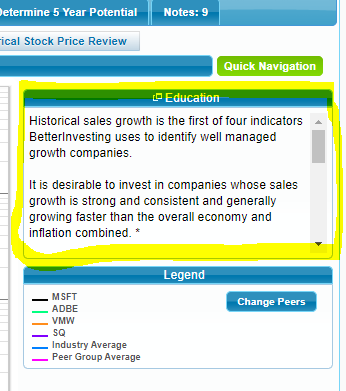
You can study the notes given in the “Education” field which are very helpful:


Here are screenshots for each step of CoreSSG.  Again, the Education field provides good background for what is shown in each screenshot.  There will be some additional discussion provided below.
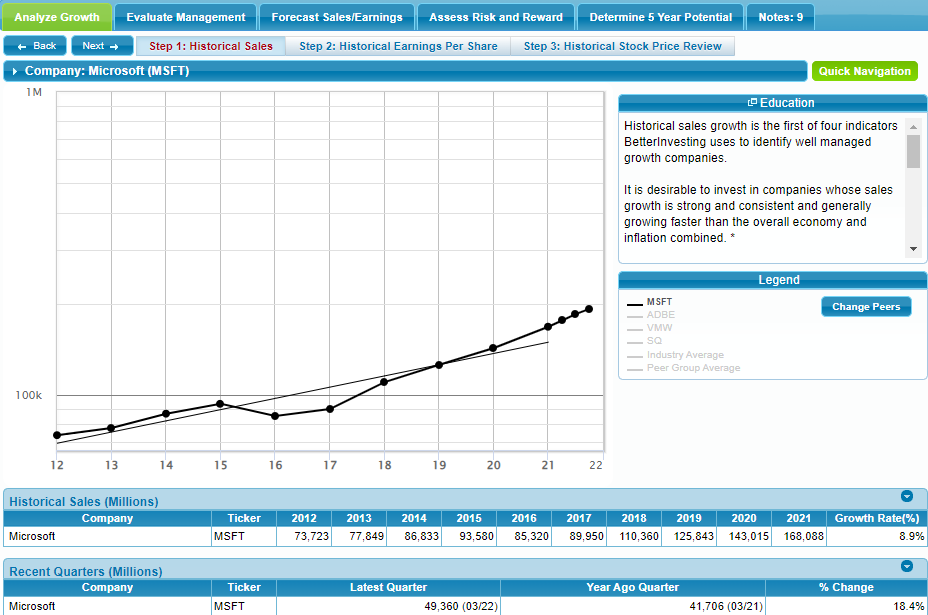
Figure 1: Historical Sales


Figure 2: Historical Earnings Per Share

Figure 3: Historical Stock Price Review


Figure 4: % Pre-Tax Profit on Sales
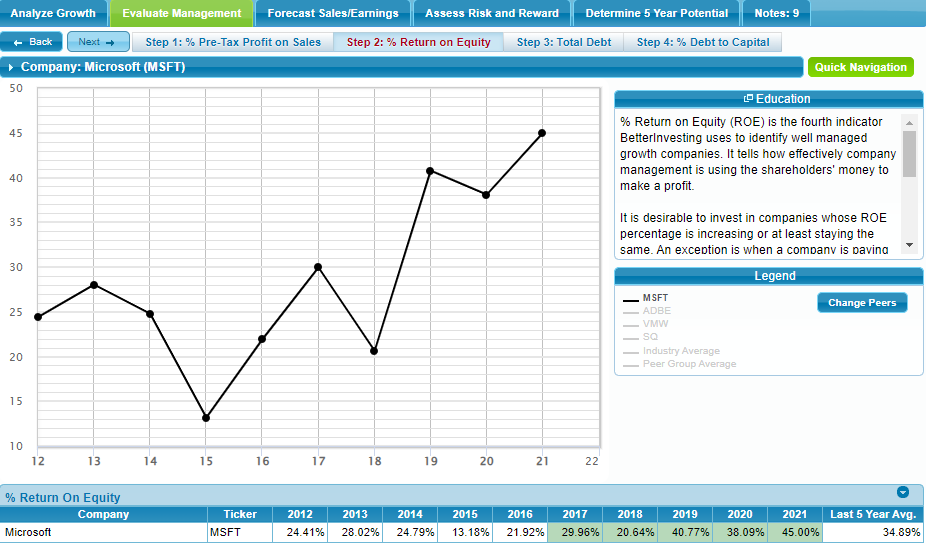

Figure 5: % Return on Equity


Figure 6: Total Debt


Figure 7: % Debt to Capital


Figure 8: Forecast Sales
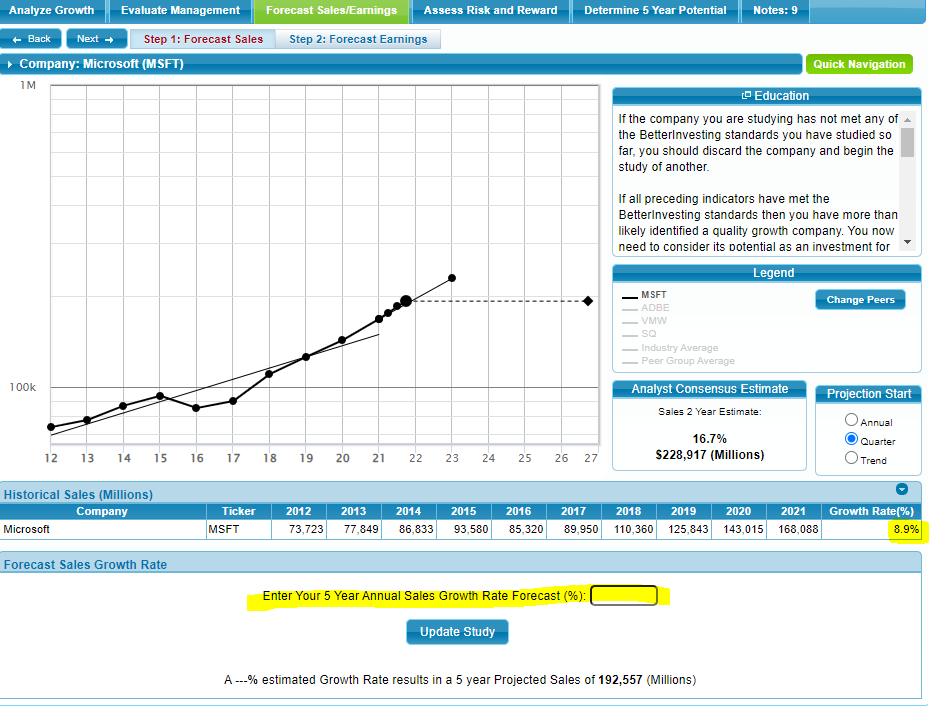

Figure 8: Forecast Sales is the first screen in CoreSSG which requires filling in the “Enter Your 5 Year Annual Sales Growth Rate Forecast (%)” field.  Try using the same value as shown under “Growth Rate(%)” in the lower left corner of the screen, or adjust your estimate according to the current economic situation (i.e. is the economy booming, or going into a recession, etc.).  There are other details provided in the “Education” field too.
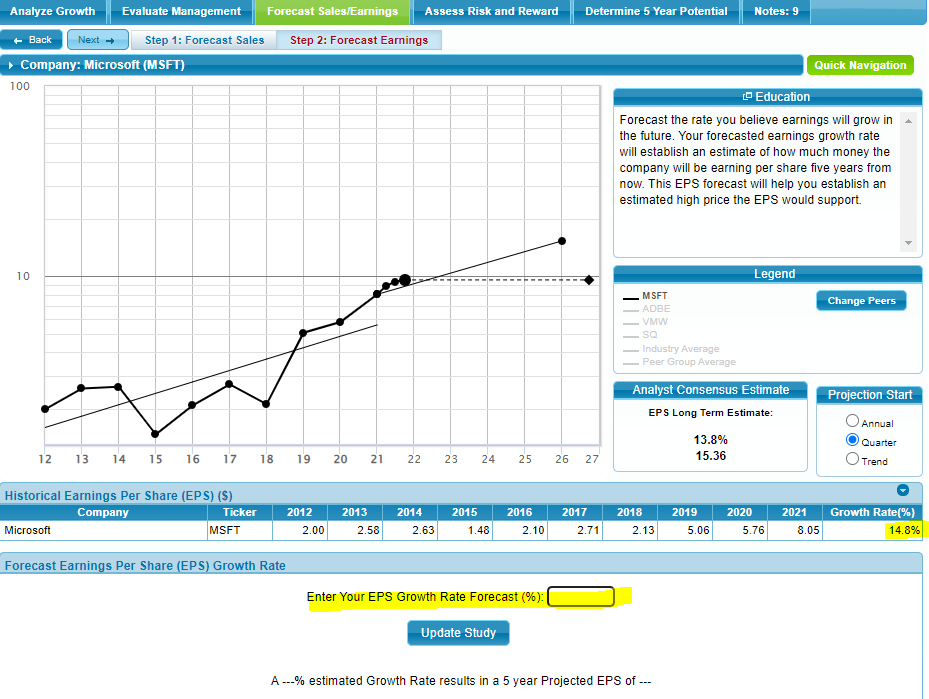
Figure 9: Forecast Earnings


Similarly, Figure 9: Forecast Earnings asks that you fill in the EPS Growth Rate Forecast (%) field.

By filling in these forecasts of Sales and Earnings, high and low estimates of PE and EPS give a basis for the high and low price estimates which will establish when to buy and when to sell, based on these forecasts.  We’ll see this in later steps below.


Figure 10: Forecast High Price

The forecast high price is calculated from your average high PE forecast multiplied by your high EPS forecast.  In Figure 10: Forecast High Price, values of 30 and 15 were entered for MSFT, which will be different for whatever symbol is being evaluated.  After entering these values, be sure to click “Update Study”.


Discussion

Forecasting the future PE, in practice, simply means putting in a reasonable number based on the 2 average P/E values shown in the lower left of the screen (just above the “Update Study” button).  Find the EPS forecast of “Figure 9: Forecast Earnings”, marked as “Analyst Consensus Estimate: EPS Long Term Estimate” shown in the figure as 13.8%.

It is worth noting: the more “glamorous” a stock is, the more “enthusiastic” (or perhaps “insane”) the market tends to be.  The market will pay less attention to company fundamentals and more on hype.  So as a result, the PE forecast will be higher than a more glamorous stock.  I.e. the price will be higher, regardless of earnings, for such a stock.

You will probably start to notice that, when comparing stocks and all other things being equal (for example earnings), the price will be inflated or deflated relative to the “glamor” of a stock.  For a less popular stock with excellent fundamentals, the PE will tend to be lower than if it is a well-known brand name with the same fundamentals or worse.  You will start to see a range of low PE which marks a good support price (where investors will buy the stock, causing it to go up in price, when it had previously been falling), and that range of low PE will be specific to that symbol, according to how glamorous that stock is.  NOTE: It begs the question, do some companies inflate their brand-name even when they have poor fundamentals, in order to inflate stock price?  By using these tools, we can avoid such companies by getting a clear picture of their fundamentals (both current and historical).
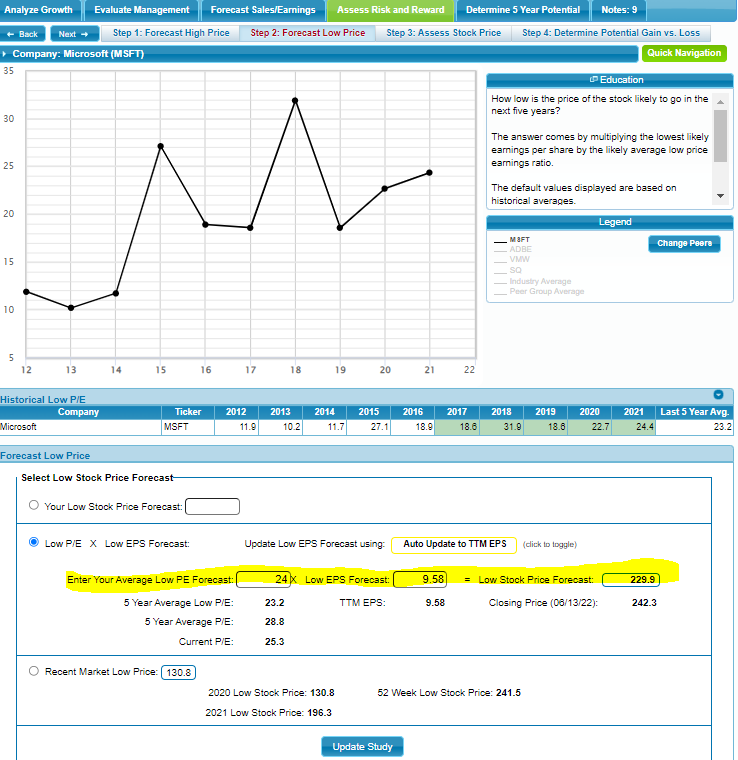

Figure 11: Forecast Low Price


For Figure 11: Forecast Low Price, follow a similar process as you did for Figure 10: Forecast High Price.


Figure 12: Assess Stock Price


Figure 12: Asses Stock Price provides a range of prices that indicate where to place a buy order, and where to place a sell order, using your previous estimates.  It will show “Invalid” if there are any issues with the estimates you provided.


Figure 13: Determine Potential Gain vs. Loss

In Figure 13: Determine Potential Gain vs Loss, the “Upside Downside Ratio” gives the probably of gain versus loss - and is recommended that at least 3 times the probability of gain makes an investment desirable.
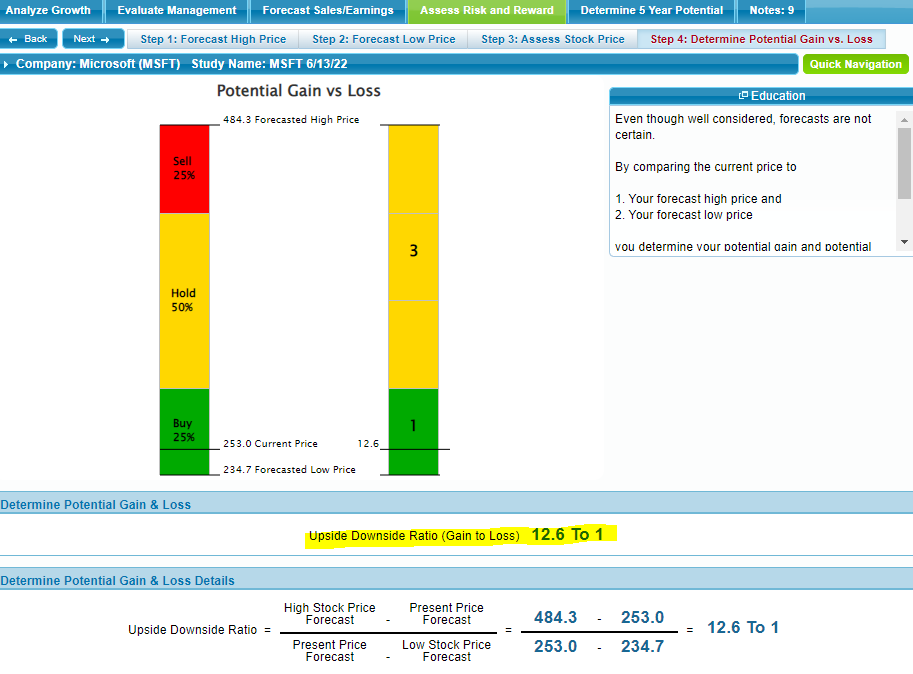
Figure 14: Determine 5 Year Potential


This figure shows the annual rate of return assuming you are able to trade at the forecast high and low P/E.
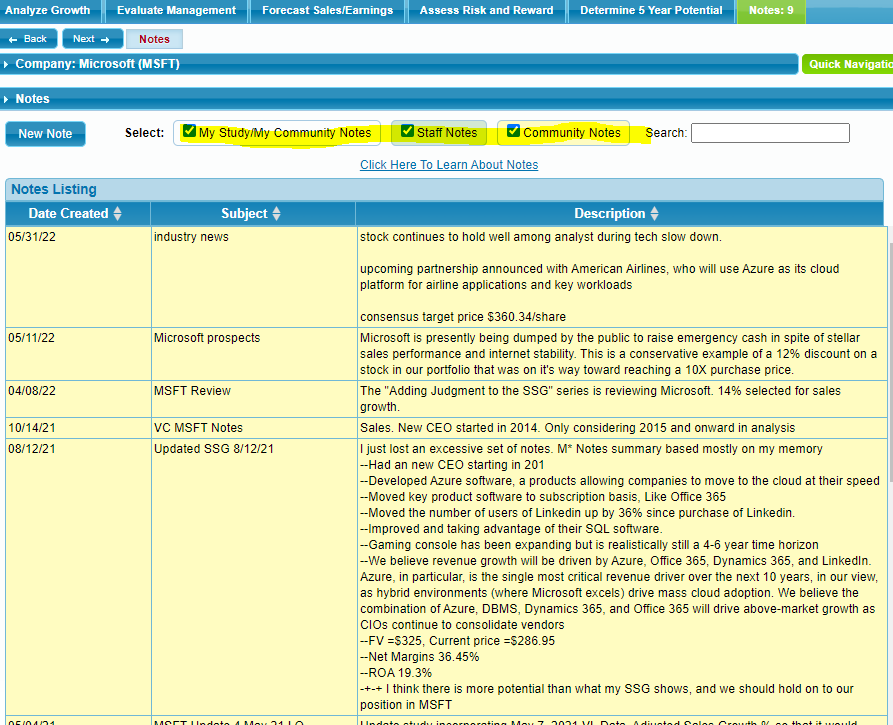

Figure 15: Notes


Staff, community and your own notes can be accessed here.


Example Analysis
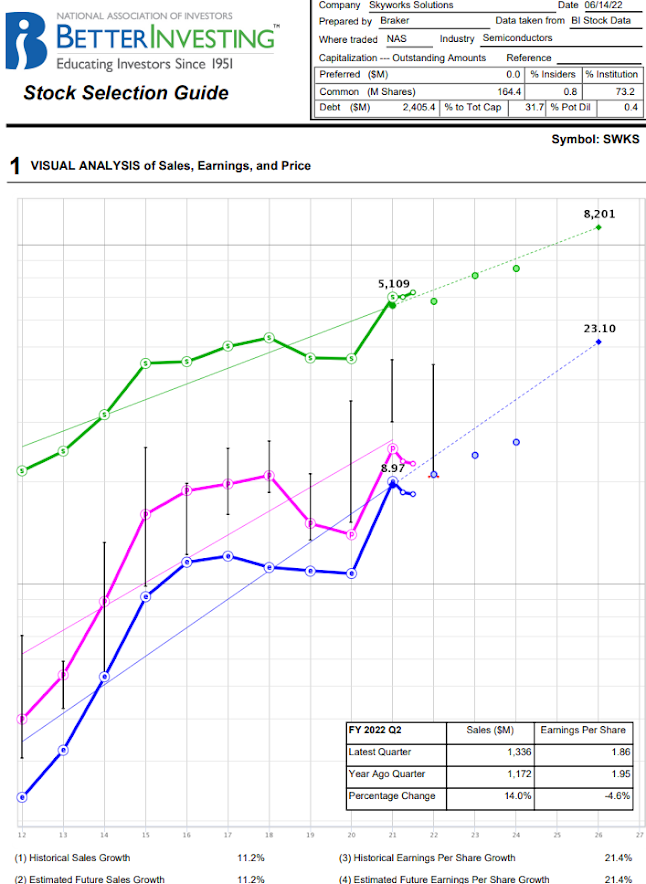
Here is an example. To generate this, I brought up a yearly chart of SWKS from 2017 to 2021, with the PE ratio as a charted indicator, and could from that, year by year, determine the yearly high and yearly low PE ratio. I could that way generate the 5 year averages by hand. But because the current year's low PE is far below this average, I had to skew both the high and low averages to a possible new low PE this year (possibly even lower than what we have right now). You should see those adjusted high and low PE estimates presented here:


Summary

By using the CoreSSG or SSGPlus tools, you can remove the guesswork of how healthy a company is, and calculate buy and sell prices for trading that company. Compared to technical trading, this is a very slow strategy that depends on yearly cycles, rather than short-term news events, to drive when to get in and out of a position.


Friday, March 18, 2016

Inheritance versus ECS Pattern Concerns

"Should these data members become the base class that this class inherits from?"  If you've ever heard this phrase, or had any discussion involving multiple inheritance, read on!

If you've read anything about the Entity Component System design pattern (ECS), you might have dismissed it as being only relevant to game design.  But ECS short-circuits the need for inheritance - so it's worth trying to understand as a tool in your belt.

I started writing this with processing architectures in mind, because it helps to visualize how the ECS pattern seems to work.  So I will first enumerate computer processing architectures I have encountered.


From The Main Event Loop to Multi-Threaded OS

If you go back to before operating systems offered multi-tasking, code was written in a loop which waited for events, and every event was then processed.  There were several weaknesses - but we don't care for this article.

Later came multi-tasked operating systems.  They allowed events to be queued up in one (or several) tasks.  Other tasks could process event handling.  Then finally we have multi-threaded operating systems.  As more processors are available, tasks can be assigned to other processors.


But all we really need to understand is the main event loop, as it mimics the processing needed to make ECS work on a per-object basis.


The Entity Component System Pattern

Lets say you've got a bicycle class.  It has a gear data member.  And you later decide it needs to have a location too, so you create a location base class and have the bicycle inherit from location.  Seems reasonable doesn't it?  Unless you aren't always concerned with location of the bicycle.

ECS allows attaching concerns to an object dynamically.  It might help to first look at how ECS is implemented and processed in time.

In terms of time organization, the ECS pattern processes concerns in a loop, just like the old main event loop processed events.  An entity can have multiple class instances attached to it, where each instance represents a concern, and those instances can, but don't have to be, attached at run-time.

For this to work, the entity has to process through a list of all attached instances and run an update method (and maybe others).  Common methods can be called directly using polymorphism, but message sending to custom methods may require reflection, or a more sophisticated approach.

Because this architecture organizes by concerns that entity is responsible for, the overall code organization tends to avoid class inheritance.  That seems like a really big deal, and if you've never had exposure to using ECS, might expose assumptions about how code needs to be organized.

Thus a concern (the location of the bicycle) is not inherited by a bicycle class, even if bicycles have location.  Instead a bicycle will have a location concern possibly attached to it.

There are always trade-offs, and workflow for architectural design might be affected.  If you don't have to worry about inheritance as much, writing code can be more straightforward.  Also it seems easier to learn new code by visually seeing which classes are attached to entities.  But the penalty is in the ECS processing at run-time.


Wednesday, March 9, 2016

Detecting Collisions in 2D

Introduction
Let's say a game object is in 2 positions over frame updates.  The 2 positions form a line L1.  To determine if the game object collided with a line L2, we look for the presence of an intersection.

We can detect the presence of an intersection (we don't care where it is) by only looking at the slopes between L1's start point and L2's endpoints, and between L2's start point and L1's endpoints.  If L1's slope is between the 2 slopes of L1's start point and L2's endpoints, and also if L2's slope is between the 2 slopes of L2's start point and L1's endpoints, a collision occurred.


Caveats
I have not compared efficiency to other methods.  However this requires no dot product calculations thus no need for taking the cosine.  [If you know of other methods and would like to share - please post a comment!]


Process


Detect the presence of any intersection between line L1 from x1,y1 to x2,y2, and L2 from x3,y3 to x4,y4.


Figure 1, Two Lines L1 and L2


In Figure 1 above, the slopes of the lines are:

For L1, slope m1 = (y2-y1)/(x2-x1)

For L2, slope m2 = (y4-y3)/(x4-x3)

----------------------------------------------------------------------------------------------


Now we can calculate the slopes between x1,y1 and x3,y3, between x1,y1 and x4,y4, and between x3,y3 and x2, y2, as shown in Figure 2 below:


Figure 2, Additional Lines L14, L13, and L32


In Figure 2 above, the slopes of the lines are:

For L14, slope m14 = (y4-y1)/(x4-x1)

For L13, slope m13 = (y3-y1)/(x3-x1)

For L32, slope m32 = (y2-y3)/(x2-x3)

We also added L31, slope m31 = (y1-y3)/(x1-x3)


An intersection exists (and thus a collision occurred) if:

( m14 > m1 > m13 ) || (m14 < m1 < m13 )

&&

( m31 > m2 > m32 ) || (m31 < m2 < m32 )


Monday, February 22, 2016

C# Reflection - It's What Allows The Entity Component System Pattern At Runtime.

Here is the C# Language Specification 5.0.

From the introduction:

C# is an object-oriented language, but C# further includes support for component-oriented programming. Contemporary software design increasingly relies on software components in the form of self-contained and self-describing packages of functionality. Key to such components is that they present a programming model with properties, methods, and events; they have attributes that provide declarative information about the component; and they incorporate their own documentation. C# provides language constructs to directly support these concepts, making C# a very natural language in which to create and use software components.

If you had never used components, you might walk away from this paragraph scratching your head "well what is component-oriented programming?"

Sadly, this is all the specification spells out specifically about component-oriented programming.

-------------------------------------------------------------------------------

Enter the Entity Component System design pattern.  Apparently there are multiple flavors, and many discussions and purists concerned with how to implement the ECS pattern, and one of those flavors is implemented in Unity, which allows components to be added to game objects in the editor, and at runtime:


// add a script foo to the gameObject
gameObject.AddComponent ("foo");


// add a collider to gameObject
gameObject.AddComponent("SphereCollider");


Unity must be taking advantage of C#'s Reflection feature to find out which components have been added to a gameObject.  I believe Reflection opened the world of component-oriented programming in C#, which is quite wonderful!  Yet searching the C# Language Specification for "reflection" only lightly discusses the reflection feature, and you might not grasp the significance by reading.

Where is the ECS pattern used?  So far I'm only aware of games.  I'm guessing Galactic Civilizations (ship editor), Fate, Reassembly, probably Skyrim, probably Trackmania, Robocraft, and WazHack among many others.

I say "probably Skyrim" and "probably Trackmania", because some features might still be implemented without ECS, but it's cleaner to add components rather than trying to anticipate every possible feature that may ever need to be added to an object.  Thus a modding feature might be best implemented with ECS, but there are other ways to allow a game to be moddable - they just won't be as future-proof.

For example, if you wanted a collapsible wall which responded to impacts, it could be coded without ECS, but it would be a nightmare.  With ECS, a collapsible wall is trivial to implement, as each section of the wall can independently respond to impacts and distribute damage to adjoining sections.

There is also some discussion that Unity "breaks" the ECS pattern by allowing code to reside in components.  Some people want the components to be data only with no methods.  My impression is they have overlooked other messaging features and Unity does it fine; it's a rabbit hole I'm not interested in digging into right now.  The way Unity implements ECS is to divide concerns into individual components.

The ECS pattern in Unity organizes the software in such a way that components can be attached to initial objects without much emphasis on inheritance.  I've written applications without ever deriving from anything other than monobehavior.

Also, if you want to understand Reflection by itself, watch C# Reflection to the Max, and thanks Jamie King for helping me grasp the concept!

Tuesday, February 9, 2016

Using C# Expression Trees for Compiling Run-time Code

This is a follow up on the Genetic Algorithms Used to Search Solution Space post several years ago.

I just became aware of C# Expression trees.  The common application is for SQL database queries.

More exciting: Expression trees can also be used to compile arbitrary code, the first step in implementing the genetic algorithms as described in the post above.

For excellent tutorials on expression trees, see Jamie King's C# Expression Trees youtube video playlist.  If you like his videos, consider supporting him in some way.


Consider the following code for Unity:

using UnityEngine;
using System;
using System.Collections;
using System.Collections.Generic;
using System.Linq.Expressions;
using System.Reflection.Emit;

public class Test : MonoBehaviour {

// Use this for initialization
void Start () {
int myC =

UnityEngine.Random.Range(0,30);


int myTI =

UnityEngine.Random.Range(-5,50);


ConstantExpression cE =

Expression.Constant( myC, typeof(int) );


ParameterExpression iP =

Expression.Parameter( typeof(int), "i" );


List<BinaryExpression> exps =

new List<BinaryExpression>(3) 
Expression.GreaterThan( iP, cE ), 
Expression.LessThan( iP, cE ), 
Expression.Equal( iP, cE ) 
};


int indexExp =

UnityEngine.Random.Range(0, exps.Count );


BinaryExpression myExp =

exps[indexExp];


Expression<Func<int, bool>> testRand =

Expression.Lambda<Func<int, bool>>( myExp, iP );


Func<int, bool> dele =

testRand.Compile();


Debug.Log ( "myC="+myC);
Debug.Log ( "myTI="+myTI);
Debug.Log ( "myTI " + myExp.NodeType + " myC = " + dele(myTI) );


}

}


Attach this script to an object in Unity (I used the main camera) and run, and you should get output something like this over several runs:

myC=17
myTI=-4
myTI LessThan myC = True

myC=20
myTI=9
myTI GreaterThan myC = False

So what is this code doing?  It's generating a random BinaryExpression at runtime, then compiling and running the expression at runtime.

When I found this I was overjoyed!  This is a relatively straightforward way to compile algorithms at runtime to search any random algorithm space.

Friday, January 22, 2016

Linux App Pt. 2


Here  I've added a few uGUI elements and optional disabling of the animation and an FPS count.

With the animation turned off (the culling mask of the animation is off in the camera), the draw calls drop to 6, which can be lowered still further to 4 without the toggle button (shown in the screen-shot above), or 3 if the buttons don't have the white backgrounds.  Still with no graphics card and the animation turned off my Mac ran 40 FPS.


Tuesday, January 19, 2016

Linux app

Today I got advice that Linux drivers are not that high in demand, and I'd do better to work on making apps for Linux.

Here's an animation program for fun.


It is big for what it does.  10MB.

All I did was take a previous Unity3D project of mine and built it for Linux (on my Windows machine).  Anyone can get the latest or older versions of Unity for free for Windows, OSX or by now almost certainly for Linux, and build an app for a Linux target.

Builds tend to be bloated (at least that was what I saw with iOS apps compared to similar iOS apps built only with XCode), and the only other tool I've heard of as a standard is Qt, which comes already installed in Linux Mint 17.3.

-------------

Also, it might be interesting to look at libusb.sourceforge.net to build USB access into a Unity3D app.  I found nothing for libusb in the Unity asset store.

For example a use case might be a USB dongle that has to be plugged in to let the app run.


Postscript
On my iMac which is running Linux, I have the GPU disabled due to missing drivers.  So this app runs unbearably slow.  This begs the question if a Unity app with no hardware support would still be okay if it was just comparable to a Qt app - i.e. just UI elements and not much 3D.

Sunday, January 10, 2016

Building the Kernel

Many years ago when I worked for a receipt printer company, I was given the opportunity to write a USB driver for Windows.  It was one of those very fast conversations "anybody want to do this?" and I watched the opportunity pass by as someone else wanted to.  Honestly, it didn't sound very appealing at the time, but ever since then I always wondered what it would take to talk to USB devices.

So I've taken up trying to learn how to do this in a Linux environment.  There are many reasons I believe this is the best use of my time at the moment, not worth going into here.  But the biggest reason is: Stayin Alive.

To get started, the Linux Device Drivers book is free for download (and there's also apparently a 4th edition).  I'm using the 3rd edition for now:

http://free-electrons.com/doc/books/ldd3.pdf

The book wouldn't let me go any further until I had built my own kernel.  And so here we are.


Hardware

Presumably building the kernel can be done on a virtual machine or an AWS ec2 instance or a raspberry pi, but for now I'm using my old dusty iMac, because it already runs Linux Mint (see Recovering Files From A Crashed Mac), and it will build faster than the rPi.

The only downside with using my iMac was a nagging sense of doubt - that it might not work.  I also noticed the Mint distributions are all odd numbered kernel versions, so I assumed they are heavily modified from the main tree.  But I found I was able to actually build the kernel and switch to it and it actually ran fine on this hardware.

For this I got Mint 17.3 32-bit Cinnamon "Rosa", just to try getting the latest.

The process for building is fortunately spelled out: How to: Compile the latest kernels (Classic Mint & LMDE).  This is an excellent guide, even though I ran into some kinks.


The First Kink
Mint 17.3 32-bit Cinnamon Rosa runs vmlinuz-3.19.0-32-generic.  Just look in /boot, or run uname -r.

So browsing to kernel.org, the closest subsequent version was 4.1.15, so I tried downloading and making this, and the make crashed.

At this point, it really helps to have no sense of dignity or pride, no feeling of "am I wasting my time" or "this is clearly not my fate in life".  It really helps to be sort of... dumb.  You know?

So what would a dumb person do?  Follow the example on the forum verbatim of course!

By following the example to the letter, which uses 3.8.7, everything built fine.  Here's my history output which should be exactly what they posted on the forums.

      Note these aren't included but updating everything can't hurt (run as root):

    3  apt-get update
    4  apt-get upgrade
    5  apt-get dist-upgrade


    8  apt-get install build-essential kernel-package libncurses5-dev fakeroot wget bzip2
    9  apt-get install qt4-designer qt4-dev-tools qt4-doc qt4-linguist-tools qt4-qmake
   10  export CONCURRENCY_LEVEL=2
   12  export CFLAGS="-march=native -O2 -pipe"
   13  export CXXFLAGS="$CFLAGS"
   14  export CHOST="x86-pc-Linux-gnu"


     Note: These I ran as a regular user:

   29  wget https://www.kernel.org/pub/linux/kernel/v3.x/linux-3.8.7.tar.xz
   30  tar -Jxf linux-3.8.7.tar.xz
   31  cd linux-3.8.7
   32  cp /boot/config-3.19.0-32-generic ./.config
   33  make oldconfig
   34  make xconfig
   35  menuconfig
   36  make menuconfig

   40  fakeroot make-kpkg --initrd --append-to-version=-mint-17.3-x86-32-16-01-09-2246 kernel_image kernel_headers
   41  ls ..
   42  cd ..
   43  sudo dpkg -i linux-image-*.deb linux-headers-*.deb
   44  sudo update-grub


Note: I think xconfig never worked for me, so menuconfig was okay, and I changed nothing in it either.

Also the build process (fakeroot make-kpkg...) took well over an hour.


The Second Kink

After rebooting, running uname -r showed the old kernel was still running.  This is because the grub apparently will run whatever the most up-to-date kernel available is.  To fix this, I ran:

  gksudo gedit /etc/default/grub

and commented out the hidden timeout references so it looked like this:

  GRUB_DEFAULT=0
  #GRUB_HIDDEN_TIMEOUT=0
  #GRUB_HIDDEN_TIMEOUT_QUIET=true
  GRUB_TIMEOUT=10
  GRUB_DISTRIBUTOR=`lsb_release -i -s 2> /dev/null || echo Debian`
  GRUB_CMDLINE_LINUX_DEFAULT="quiet splash"
  GRUB_CMDLINE_LINUX=""


This allowed a selection menu to show up at boot.  The "advanced" menu allowed selecting the older kernel I had built.

Display Driver Issues
Lastly, just booting into that kernel didn't work because the iMac's nVidia drivers don't run.  So instead, select the "recover mode" version of the kernel, and after that boots up run the first option (something like "resume") which bypasses hardware video support altogether.  I'm writing this blog post from that build right now.  Note that the forum also explains in the same thread how to run the nVidia driver after first running:

   update-initramfs -k `uname -r`

(note the ` character not ' as the forum says).  I started to try this, didn't know where to get the nvidia driver and more importantly, I don't care.  This is adequate functionality to move forward with the Linux Driver book.

Thanks!


PostScript

Right after posting this, I tried hybernating the machine, which resulted in severe problems with booting up that kernel (even when it had already booted twice).  Specifically, the initrd.img* file for the built kernel is somehow missing.  I was able to fix this by running dpkg and update-grub again (after renaming things dpkg complained about) - but I have no explanation how the initrd.img* file got deleted.   So this whole approach is somewhat unstable for now.


Wifi Drivers


For a Mac, to get Wireless working, try this.  Namely, connect via an Ethernet cable, and run these commands:

 sudo apt-get purge bcmwl-kernel-source broadcom-sta-common broadcom-sta-source
 sudo apt-get install linux-firmware-nonfree b43-fwcutter firmware-b43-installer

and then reboot.

Thursday, January 7, 2016

Unity Versus Sencha for Mobile App Development

This whole discussion is mostly academic for me.  I post it for whoever might have an interest in these tools.


Recently I looked into the Sencha development environment.  It reminds me a lot of Maqetta, specifically the sliding UIs it generates.

I've looked into whether similar UI is available off-the-shelf for Unity (especially for workflow), and so far it looks like it's not.  I wrote a UI from the ground up using uGUI, but this adds extra weight which isn't present in the Sencha UX, and the workflow isn't anywhere close to as streamlined.

All I can say is Unity still thinks of itself as a game engine, rather than a mobile app engine.

It has not yet matured in the direction of rapid UI development.  I have this nagging feeling I want to create a Sencha-like UX in Unity, which only animates going between scenes while not actually using a Unity uGUI scroll-rect to hold them all.  Mostly I want to do this to improve the whole game development workflow, of which UI design can be a good starting point.

But again... this discussion is mostly academic.

Live and learn.  Unity is still more efficient than going through multiple target learning curves (i.e. Xcode for iOS + Android API).

Will I switch to HTML5?  Only if three.js or other tools can bridge the gap.  Push notifications look like they are available at least for Chrome (and possibly exclusively to GAE).

Google may kill Unity altogether eventually.

Thursday, December 31, 2015

A Model for Corporate Power Distribution

In 1997 Geoffrey B. West, James H. Brown and Brian J. Enquist published "A General Model for the Origin of Allometric Scaling Laws in Biology".  I don't have access to the paper, but it is summarized in a youtube video here:


How Fractal Patterns Perpetuate Through a Tree, and then a Forest - Bonzai Permaculture -

In 2009 they also published A general quantitative theory of forest structure and dynamics.

The gist of the studies is that an individual tree's branch distribution (size, distance between branches, and most importantly oxygen production) provides an accurate prediction of the whole forests tree distribution.


I tend to believe these studies provide a basis for company skill level distribution.  Call it "brain power" if you want.  In a power-optimized company, there will be a fractal distribution of people with various capacities and skills.  They won't all be power-players because there is mundane work that also needs to be done - there's a wide distribution of needs addressed by a wide distribution of workers.

The alternative is a farm-model, where the whole undergrowth of a wild forest is stripped away.  This then becomes a question of whether the farm is more efficient than the forest.

Tuesday, December 22, 2015

The Harass-Justify Pattern

I did not even want to write about this.  Then I load youtube to watch a tutorial on Scala, and up pops this ad!

I had already written this article in my head, decided I didn't want to write about it, and then I see exactly the ad I was thinking about, all in a matter of about 1 minute.

Okay!  I'll write about it!  Here's a screenshot of the ad:


Harass

The ad starts out by saying "these are real people".  I.e. they are not actors, other than the guy throwing eggs at them.

As the people go to sit down at the table, the man in the middle throws eggs and the real people jump in surprise.


Justify

If you didn't skip the ad, the middle man explains something about "life is hard to respond to when there are surprises" or something along those lines.  The justification for the harassment of throwing eggs at complete strangers is "I have some insight to share."


The Pattern

Whether or not the insight is valuable is not really interesting to me.  What is interesting is that the 2 behaviors "harass" and "justify" are presented in combination.  Throwing an egg by itself isn't enough.  And justification by itself apparently isn't enough either.  It is a theatrics pattern.

That's all... I'm going to watch about Scala now.


POSTSCRIPT

This is really obsession-compulsion, where "harass" is the compulsive behavior ("I must"), and "justify" is the obsessive thinking.  The justify is like a broken record that keeps playing over and over again.  There's some projection of "if everyone only could see what I'm obsessing about, they would understand my harassing behavior".  Such thinking is fantasy.

I guess the pattern could be generalized into Powerplay-Justify.  It's a "when words are many, sin is not far..." sort of thing.  Something about it doesn't smell right, as opposed to people operating in a natural outflow.

We could ask "what is source of obsessive thinking?"  There is a source.

Wednesday, December 16, 2015

Getting Started with HP's Fabric-Attached Memory Emulator


HP's The Machine

HPE has new hardware coming out soon called "The Machine".

If you want to write software for The Machine, you can start learning about it here:

https://github.com/FabricAttachedMemory/Emulation


I won't claim to be any sort of expert, but I was curious to try.  The point of this post is, don't let anything get in your way.  If you are not a "guru" - just do whatever you need to do and there will be something learned in the process.


Run Debian 8.x

I'm on a Windows Vista PC, and I already have Oracle VirtualBox installed, so it wasn't very difficult to start a virtual machine that runs Debian 8.2.0.  I got my Debian distro here for an i386, but you might need a different target processor if you're running an AMD machine.  It's an iso file, and has to be burned to a boot disk (supported in newer versions of Windows, on my old Vista box it brings up Roxio Easy Media Creator 9 for burning an iso to a disk).  Alternatively you could use real hardware to install Debian, or a VM in AWS et. al. - you might even be able to do this on a raspberry pi (though I doubt it due to version requirements of the package).

NOTE: When setting up the virtual machine, the HD must have at least 19GB free, so I recommend something larger.  After more than 1 attempt, I was able to succeed with a 27GB HD fixed size HD for the VM.  It looks like 22GB would have been enough.

If you are new to Debian, try finding Search and type "terminal" to open a terminal.  My Debian install did not run sudo from the terminal.  That's okay.


Install Git

For now I'll ignore no sudo.  After installing Debian, and logging in as a user, I could log in as root via "su", and then:

$ apt-get update
$ apt-get install git-core


then log out of root and go to the user's ~ home directory and run:

$ git clone https://github.com/FabricAttachedMemory/Emulation.git

This resulted in an Emulation directory and I could run:

$ ./emulation_configure.bash 1

which failed with:

Error: The Following command(s) are needed:
vmdebootstrap virsh sudo qemu-img brctl


Install QEMU, vmdebootstrap and libvirt-bin

From root:

$ apt-get install qemu-kvm

$ apt-get install vmdebootstrap

if you need sudo:

$ apt-get install sudo

and finally:

$ apt-get install libvirt-bin


Run it (still from root):

$ ./emulation_configure.bash 1

It asks:

Change /usr/lib/qemu-bridge-helper to setuid root (yes/no) ?

yes

Error: /tmp has less than 19 G free

At this point I couldn't find any way to extend the HD on the VM.  If needed you might try creating another volume and mounting it - but I started over.

With adequate HD on the VM, it now complains "No proxy setting can be ascertained", then eventually:

Failure trying to run: chroot /tmp/tmpDx8e9z mount -t proc proc /proc

and

Build of /tmp/fabric_template.img failed

Looking into the documentation at https://github.com/FabricAttachedMemory/Emulation.git might give some clues where to go next, but that's as far as I will go today.  Thanks.